

You’ll notice overlapping terms that express the same search intent in slightly different ways as you build your SaaS keyword list.
So the question is: which keywords deserve their own page, and which belong together?
That question is what Keyword clustering provides a practical answer to, since it shows you which keywords belong to the same page and which deserve their own. It groups related keywords by meaning and search intent. This way, you can cover an entire topic with one authoritative page instead of multiple competing ones.
In this guide, you’ll learn what keyword clustering is, why it matters, and how to apply it step by step. It is also part of our complete SaaS keyword research framework and shows where clustering fits into your overall keyword strategy.
What Keyword Clustering Means
Keyword clustering is the process of grouping keywords that share the same topic and the same search goal. This is why you shouldn’t treat each keyword as its own page; instead, you treat each group as a single page.
For instance, take a close look at these three keywords: “SaaS onboarding software,” “best onboarding tools for SaaS,” and “SaaS user onboarding platform.” You’ll discover that these are not three different topics. And that’s because they are one topic that is written three different ways.
With that in mind, a clustering process groups them and builds one page strong enough to rank for all three.
In simple terms, clustering is a structured process that is built on two core elements: semantic meaning and search intent. Semantic meaning tells you if two keywords mean the same thing. On the other hand, search intent tells you if two keywords serve the same goal. The reality is that you need both checks before grouping keywords.
Why a Growing SaaS Hub Needs Clustering Before It Scales
B2B SaaS teams move fast. Marketing wants to publish more content, while sales needs pages that answer buyer questions. But that speed creates disorganized content that competes for the same searches without keyword clustering.
This issue is known as keyword cannibalization.
That’s the bad news! But the good news is that keyword clustering helps you prevent it. In practice, grouping related keywords before assigning pages helps you ensure that each page targets a distinct search intent.
Another reason why keyword clustering is important is that it also strengthens topical authority. As a rule, Google gains more confidence in a page when it sees that it covers a topic comprehensively and naturally includes the keyword variations buyers search for.
That’s why one comprehensive page built around a cluster of related keywords often outperforms several thin pages that each target a single keyword.
Keyword Clustering vs Keyword Mapping
Many founders and CMOs often mix up clustering and mapping, when in reality they are two different steps. Mixing them up leads to a messy site structure.
As a rule, clustering comes first. It groups keywords by topic and intent, without any thought to your site’s pages yet. At this point, you are asking and trying to answer this question: which keywords belong together?
So mapping comes second. Once you have your clusters, you can then assign each cluster to a specific page or URL on your site. Here’s the thing: your efforts with keyword mappings center on answering this question: where does each cluster live?
Think of keyword clustering as sorting your keywords into boxes, while keyword mapping, on the other hand, is deciding which page each box belongs to. Here’s one truth that most B2B SaaS teams miss: If you skip clustering, you’ll assign keywords to pages at random, and that creates content gaps and keyword overlap.
Once you’ve organized your clusters and want to learn how to assign them to the right pages, you can read our complete guide to keyword mapping.
How to Find the Keywords to Cluster
Once you know clustering and mapping are different steps, the next question is mechanical: where do you actually find the keywords to cluster in the first place? Here’s the process
Step 1: Pull Your Seed Keywords
A seed keyword is a broad topic that represents one area of your business. Note, you are not trying to target seed keywords directly. Instead, you are using them to find the specific queries your buyers actually type.
The idea is to start with three to five seed keywords that sit close to your product or service. For instance, a B2B content marketing agency might start with: B2B content strategy, content marketing for SaaS, B2B blog SEO, B2B lead generation content, and content cluster strategy.
Where to pull keywords from
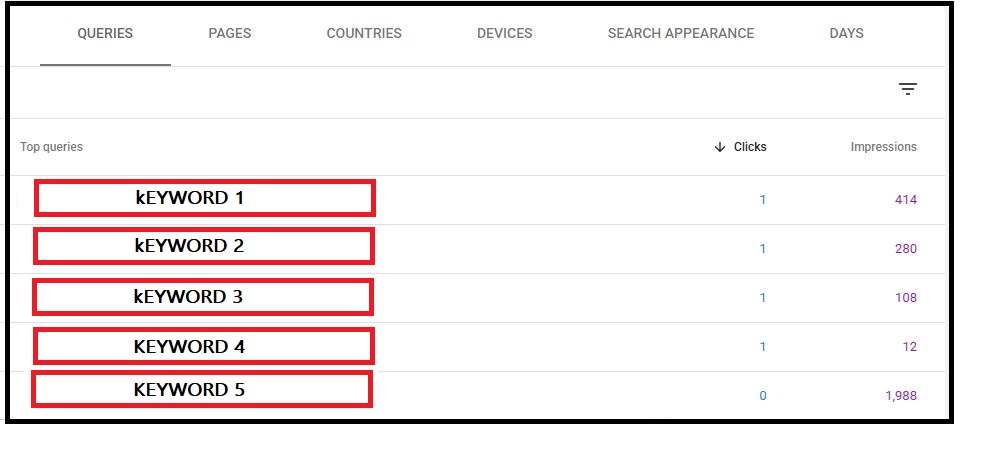
Google Search Console:
Go to Performance, then Queries. Filter by your site and look at every query that has earned at least one impression in the last six months. Export the full list. This is real data from real buyers who found or nearly found your site. It is the most accurate seed list you have.
Ahrefs Keyword Explorer:
Once you enter each seed keyword, you can do “Matching Terms” and filter for keywords between 10 and 2,000 monthly searches.
This is critical because B2B keywords have low volume by nature. A query with 90 monthly searches in a B2B SaaS category can be worth more than a 5,000-search consumer query if it pulls buyers at the decision stage.
Competitor gap analysis:
In Ahrefs, you can go to Site Explorer and enter a competitor URL. Then click Organic Keyword and Filter for positions 1 to 10.
The goal is to export every keyword they rank for that you do not. These are topics your buyers search for that you have no page targeting for.
People Also Ask and related searches:
You don’t need paid SEO tools like Ahrefs or SEMrush to access these. All you need to do is type your seed keywords into Google. The People Also Ask (PAA) box and related searches at the bottom of the SERP surface real question-based queries. Add the relevant ones to your list.

Now here’s the thing: you need to come up with all four sources into one spreadsheet. You don’t have to filter yet. At this stage, you want every relevant keyword in one place.
Step 2: Group Keywords by Search Intent
Search intent is the job a keyword is trying to do. Two keywords can look identical and have completely different “intents”. “B2B content strategy” and “B2B content strategy agency” both contain the same phrase. One is informational, and the other is commercial. So they belong to different pages.
And that’s why this step is important: you sort every keyword in your list into one of four intent buckets:
Informational:
The buyer wants to learn. Examples of search terms with informational intent include “What is B2B content strategy,” “how does content marketing work,” and “what is a topic cluster.” They all go on educational blog posts and pillar pages.
Instructional:
The buyer wants to do something. Usually, these are queries that how-to posts and guides satisfy. Here are typical examples: “How to build a B2B content strategy,” “how to cluster keywords for SEO,” “how to write a content brief,” etc.
Commercial:
Here, the buyer is comparing options. So they might use phrases like “Best B2B content marketing agencies,” “Surfer SEO vs Clearscope,” and “MarketMuse pricing.” Ideally, these search queries go on comparison posts or service pages.
Transactional:
keywords that fall into this category often show the buyer is ready to act. “Hire B2B content marketing agency,” “B2B SEO services,” “book a content strategy call.” Often, queries like these go on landing pages and service pages, not blog posts.
Now, to do this, you should add an Intent column to your spreadsheet and label every keyword. But if you are unsure about a keyword’s intent, you can type the keyword into Google and look at what is already ranking.
The SERP shows you what Google has decided the intent is. For instance, if the top results are all definitions and guides, that tells you that the intent is informational. But if they are comparison pages and service listings, the intent is commercial.
The SERP is the most reliable intent signal you have. When in doubt, let Google tell you what type of page belongs on page one for that query.
How Search Intent Guides Your Clusters
You cannot cluster keywords correctly without checking search intent first. Two keywords may look similar, but they can serve completely different goals.
Take “SaaS pricing models” and “SaaS pricing page examples.” These keywords look closely related, but they have different intent.
Someone searching for “SaaS pricing models” wants to learn about pricing strategies. Someone searching for “SaaS pricing page examples” wants to study real pricing pages, often for competitor research or design inspiration. But if you combine both topics on one page, you make it harder to satisfy either searcher.
The idea is to always check the intent behind each keyword before you build a cluster. Our full search intent framework explains the four main search intent types. It also covers three extra intent types for B2B SaaS: integration, migration, and job-based intent. You can use that framework to confirm the intent before you group any keywords.
Search intent is only one part of the decision. This is why, before you place keywords in the same cluster, check a few more signals:
- They rank for many of the same top search results.
- They target the same stage of the buyer journey.
- They solve the same searcher’s problem or goal.
- They share the same core topic, even if they use different modifiers.
When these signals match, the keywords usually belong in the same cluster. If they do not match, create separate pages for them.
Grouping by Funnel Stage
Intent tells you what type of page a keyword belongs on. But a funnel stage tells you where in the buyer journey that page should sit. And understanding that these are two different filters and that you need both is critical.
Here are the four funnel stages:
Awareness:
At this stage, buyers recognize they have a problem but haven’t identified a solution yet. They search for answers with queries like “Why is our blog not getting traffic?”, “How does B2B SEO work?”, or “What is topical authority?”
Suppose you are part of a B2B content strategy agency; it’s expected that your team’s cluster posts should answer these questions, educate readers, and build trust without trying to sell.
Consideration:
Buyers are evaluating approaches or options at this funnel stage. For a B2B content strategy agency, the typical search terms prospects would be using include “How to build a content cluster,” “B2B content strategy examples,” “best tools for B2B blog SEO,” etc.
This is why cluster posts at this stage should aim at showing searchers how a solution works.
Decision:
The buyer is choosing between specific options at this stage. Following the B2B content marketing agency example, typical queries of prospective clients would include “B2B content marketing agency vs in-house,” “MarketMuse vs Clearscope for B2B,” “content strategy retainer pricing,” etc.
That’s why pages at this stage should aim to address the final objections before a buyer acts.
Now here’s the thing: you can add a Funnel Stage column next to your Intent column in the keyword sheet you created in Step 2. This gives every keyword two clear labels: the type of content it needs and the stage of the buyer’s journey it supports.
The idea is to group keywords with the same intent and the same funnel stage on a single page. And create separate pages for keywords with different intents or funnel stages, even when they cover similar topics.
Separating Pillar Keywords From Cluster Keywords
Once you label each keyword by intent and funnel stage, separate your keywords into these two groups: pillar candidates and cluster candidates.
Brief explanation of these two groups:
Pillar keywords
Pillar keywords are broad, high-volume terms that define an entire topic. For a B2B content marketing agency, examples include “B2B content strategy,” “SaaS SEO,” and “B2B lead generation.”
Your pillar page targets the pillar keyword and introduces every major subtopic without covering any single one in depth.
Cluster keywords
Cluster keywords are specific, often long-tail terms that explore a single subtopic in depth. Examples include “How to build a B2B content cluster,” “B2B content strategy examples,” and “keyword clustering for B2B blog SEO.” Each cluster post targets one of these keywords and covers the topic thoroughly.
Here’s a simple rule you can use to set them apart: a pillar keyword covers a broad topic that could keep a reader engaged for an hour. But a cluster keyword answers one specific question or solves one focused problem.
For instance, if one article can fully cover the topic, you should treat it as a cluster keyword. But if the topic naturally breaks into multiple subtopics, and each is worthy of its own article, then you should treat it as a pillar keyword.
The difference becomes much clearer when you see it in action. Real-life cluster examples from brands like HubSpot and Gong show you exactly which terms those companies treated as pillar keywords and which ones became cluster posts. The architecture is visible in how they organized their content.
Building Your Keyword Map: A Worked Example
This step brings the entire process together by applying everything you’ve covered so far. To see how it works in practice, use a real B2B topic: “B2B content strategy.”
You can start by pulling 40 related keywords from Google Search Console and Ahrefs (or any other tool like SEMrush). Then, label each keyword by intent and funnel stage, and assign it to either a pillar page or a cluster page.
For this example, assume we’ve already completed those steps and organized the keywords into their appropriate pages. Here’s what it will look like:
| Keyword | Intent | Funnel stage | Assign to |
|---|---|---|---|
| B2B content strategy | Informational | Awareness | Pillar page |
| what is B2B content strategy | Informational | Awareness | Pillar page (semantic var.) |
| B2B content strategy examples | Informational / Research | Consideration | Cluster post: Examples |
| B2B content strategy framework | Instructional | Consideration | Cluster post: How-to / Framework |
| B2B content strategy agency | Commercial | Decision | Service/landing page |
| B2B content strategy template | Practical / Tool | Consideration | Cluster post: Templates |
| B2B content marketing vs B2C | Informational | Awareness | Cluster post: Comparison |
| How to build a B2B content plan | Instructional | Consideration | Cluster post: How-to |
Note, this grouping creates one pillar page that targets “B2B content strategy” and four cluster posts that each target a distinct intent: examples, frameworks, templates, and comparisons.
Another thing to observe is that the commercial keyword moves to a service page instead of a blog post. And that’s because it targets buyers who are ready to evaluate solutions.
The interesting thing about this approach is that it prevents keyword overlap and content cannibalization.
Now, let’s say you combined “B2B content strategy,” “B2B content strategy examples,” and “B2B content strategy template” into one article. The reality is that such a page would compete against itself for three different search intents. And when that’s the case, Google would have a harder time determining which query the page should rank for. This, in turn, causes the page to perform poorly across all three instead of ranking strongly for one.
Pro Tip: One intent per page. That is the rule that keyword clustering enforces. It is not a style preference. It is the structural reason some blogs rank, and others do not.
Identifying Semantic Variations
Some keywords appear different but represent the same search intent. For example, “B2B content strategy” and “B2B content marketing strategy ”are semantic variations because they target the same topic, funnel stage, and answer. This means these keywords should be on the same page.
Here’s a simple test you can use to identify semantic variations. Ask this question: Could one article fully answer both queries without feeling scattered or unfocused?
If the answer is yes, then combine the variations into a single page. The idea is to use the highest-volume keyword as the primary keyword, and then incorporate the related variations naturally throughout the content.
Still, a common mistake teams make is treating every keyword variation as a separate topic and creating a new post for each one. Imagine creating separate articles for “B2B content plan,” “B2B content roadmap,” and “B2B content calendar.” That would create unnecessary overlap because these keywords target nearly the same search intent. And publishing separate pages would lead to keyword cannibalisation, since it is natural for them to compete against each other.
To apply this step, return to your keyword spreadsheet and add a Primary Keyword column. Then assign each semantic variation to the primary keyword that represents its group. If a keyword maps to an existing primary keyword, then merge it into that page instead of creating a new one.
How Clustering Prevents Keyword Cannibalization
Keyword clustering helps you prevent keyword cannibalization before it starts. When you group keywords correctly, each keyword gets one clear home before your team creates a page. This prevents multiple pages from competing for the same search intent and keeps your site organized.
If you want to learn how to find and fix keyword cannibalization on an existing website, read our complete guide on SaaS keyword cannibalization. It walks you through the full audit process, common causes, and the best ways to resolve overlapping pages.
Common Mistakes Teams Make With Keyword Clustering
1. Trusting software without a manual check. Clustering tools group by surface-level similarity, not always true intent — always run a manual SERP check before finalizing a cluster.
2. Building clusters too small. A cluster with only two thin keywords rarely earns its own page. Fold it into a larger page as a supporting section instead.
3. Clustering across different buyer segments. An enterprise-buyer keyword and a similar SMB keyword may look alike, but they often need separate pages with separate messaging.
4. Spreading semantic variations across multiple pages. “B2B content plan,” “content roadmap,” and “content calendar” are the same intent expressed three ways — one page, not three.
5. Mixing informational and commercial intent on one page. A page that defines a concept and pitches a service at the same time serves neither reader well — split them.
6. Building a pillar page around a long-tail keyword. Pillar pages need broad head terms; long-tail specifics belong on cluster posts.
7. Forgetting to update clusters over time. Buyer language shifts and competitors launch new terms — review clusters quarterly.
Tracking Cluster Performance in Google Search Console
Once your cluster is live, track it as a system, not as individual posts. A cluster post that earns 50 impressions on its own tells you little. But a cluster where every post is gaining impressions, and the pillar page is climbing for its head term, tells you the architecture is working.
What to track in Google Search Console
Cluster-level impressions:
In GSC, you can filter Performance by page for each cluster post URL. And then, add their impression counts. The goal is to track this monthly. Note, a rising cluster-level total means Google is recognizing the topic authority you are building.
Position 11 to 30 keywords:
Filter your keyword list to positions 11 to 30. These are your fastest ranking opportunities. A cluster post sitting at position 14 for its target keyword is one content update away from a page-one result.
Click-through rate by cluster post:
A post earning 400 impressions with a 0.5% CTR has a title or meta description problem, not a ranking problem. In a case like this, it’s better to fix the title before writing new content.
Pillar page position for head term:
As you publish more cluster posts, the pillar page should climb for its primary keyword. The cluster posts pass internal link authority upward. But if the pillar page is not moving after three months of cluster posts going live, check whether every cluster post is linking back to the pillar with descriptive anchor text.
Track the cluster weekly for the first three months after launch. After that, monthly is enough. Note, the early signals tell you whether the architecture is working before you invest in more content.
How to Use Clusters Across Your Content Hub
Clusters become the backbone of your content hub once you’ve successfully built them. And every time you find a new keyword, you first place it under a “clustering check.” That means answering this question: Does this belong to an existing cluster, or does it start a new one?
This habit keeps your hub organized as it scales from a handful of pages to twenty or more.
Another thing is that clusters also guide your internal linking. For instance, pages built from the same cluster theme should link naturally to one another, since they serve related but distinct intents for the same buyer.
Likewise, every cluster page should link back to your pillar page. This turns your hub into a connected system instead of a scattered collection of blog posts.
Now, if you want to learn the foundation of building topical authority that supports long-term organic growth, read our guide on B2B content clusters.
